


In times of increasing data volumes, companies are faced with growing demands to manage this data in a structured manner so that it can be retrieved at any time with reasonable effort. Many platforms are available on the market for this purpose. The industry relies on flexible platforms such as Hana from SAP, Microsoft Dynamics, IBM or Oracle. What all these platforms have in common is that they already contain a large number of standard processes and can be expanded by IT specialists to include additional databases and functions. For small and medium-sized enterprises (SMEs), however, such solutions are often prohibitively expensive due to relatively high investment costs.
For this target group, FileMaker offers a Database-The FileMaker platform makes it easy to create customized business applications for any data and processes. FileMaker can be purchased as an individual product or as a complete package for use in the Network with multiple users, which also includes a server license. Mac, Windows and iOS devices as well as browsers under macOS, Windows, iOS and Android can be used as clients. FileMaker databases can be made available in various ways and, of course, always in compliance with the GDPR. With gFM-Business a ERP software which was developed on the basis of the FileMaker platform and is also available as a customizing or open license for adaptation and expansion.
Table of contents
Get any data into shape with FileMaker
Every company regularly generates a wide variety of data that needs to be processed as part of different processes. In small and medium-sized companies, such data is often initially recorded manually, either in separate documents such as Excel spreadsheets, Word files or sometimes even on paper. If this data has to be reused at another point in the process, the same data is regularly entered several times, which requires additional effort and increases the susceptibility to errors. This is often the case not just at one point, but with a lot of data within the company. The result is often countless external files and lists, which are often even stored in disorder on different clients. This procedure costs the company a lot of time and effort, because data has to be searched for again and again or data has to be entered several times. For this reason, large companies often use database products such as SAP, Microsoft Dynamics or Oracle, which can be (cost-intensively) adapted to individual processes.
FileMaker is a flexible database platform that is also suitable for small and medium-sized companies and can be used on macOS, Windows and iOS as well as in the browser on Android. FileMaker Pro Advanced is the tool with which new databases can be created or existing databases expanded. This software is available for macOS and Windows and costs approx. 550 euros plus 19% VAT. FileMaker Pro Advanced contains all the tools required for the development and expansion of databases. The software also includes the option of making open FileMaker databases available to up to four other users on the network. The databases can then be shared with either FileMaker Go on an iPhone or iPad or on Windows or Mac with another FileMaker Pro Advanced license.
Starter solutions for the first steps
FileMaker Pro Advanced contains more than 20 Starter Solutions for various purposes, which can be easily customized and extended to meet individual requirements. All Starter Solutions are ready-to-use FileMaker databases with all the necessary data tables, scripts and an attractive user interface. FileMaker Pro Advanced 17 contains Starter Solutions from the following subject areas:
- Attachments

- Tasks
- Expenditure report
- Content Management
- Event management
- Research notes
- Inventory
- Contacts
- Cost estimates
- Meetings
- Personnel data
- Product catalog
- Projects
- Invoices
- Resource planning
- Time accounting

Mapping individual data and processes in FileMaker
In order to use FileMaker to map individual data and processes, the complete process with all the necessary data should first be documented in writing. As soon as this documentation is available, you can immediately start implementing the data structure and the process in FileMaker:
- Creation of all required data tables and fields. FileMaker is suitable for storing text, numbers, images, videos and any documents. In addition, field formats are available for date, time, timestamps and any formulas that can be calculated in real time.
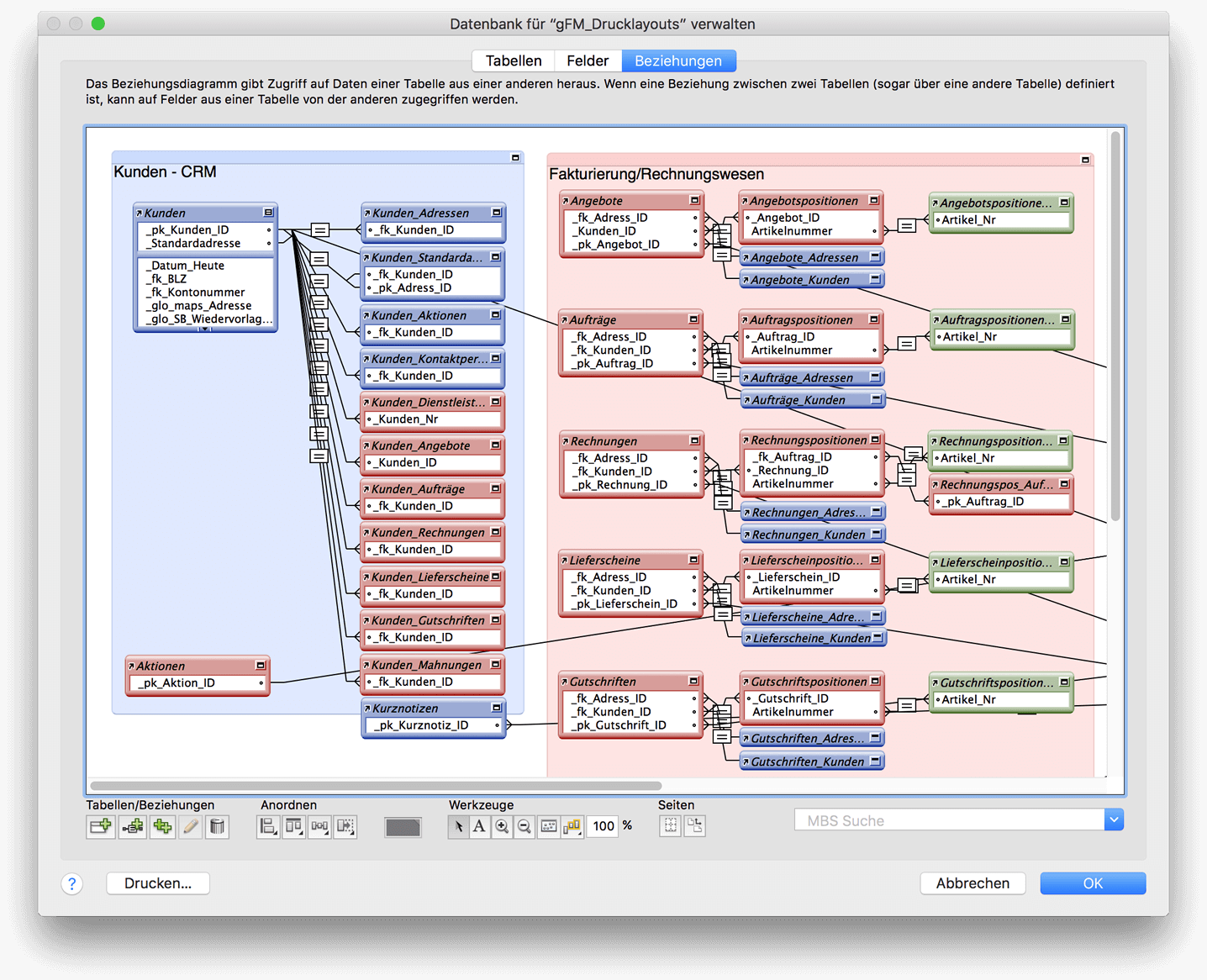
- Links between tables. Databases usually have a relational structure, i.e. they consist of different data tables that are linked to each other via a unique key. If, for example, any number of contact persons are to be stored for a company data record, two tables (company and contact person) are used, which are usually linked via the company ID.
- Creation of the user interface. FileMaker Pro Advanced includes a powerful layout editor that can be used to create complex user interfaces. If field names and labels are saved in a database, multilingual user interfaces can also be created, which are displayed in a different language depending on the setting.
- Programming of scripts. In addition to the user interface, scripts are required to automate any processes in a FileMaker database. The FileMaker integrated Scripteditor is very powerful and allows object-oriented programming with sub-scripts and script parameters. Extensive evaluation scripts can also be executed (at definable times if desired) on the Server be executed.
Expand database solution during operation
One of the advantages of FileMaker is that databases can be expanded as required during operation. Even if the database has already been released for shared use on a server, further data tables, fields, layouts or scripts can be created or existing objects edited without any problems. The changes are then immediately available to all connected users.
The use of FileMaker in practice
Local use of FileMaker databases
 FileMaker databases can be used very flexibly in practice. The classic is certainly the use of a local database with FileMaker Pro (Advanced). To do this, a FileMaker database is simply opened with FileMaker Pro (Advanced) and can be used or edited locally on the corresponding workstation immediately.
Using FileMaker Pro on the network via sharing
But FileMaker Pro (Advanced) can do even more, as it also supports the sharing of FileMaker databases with up to four other users on the network using the peer-to-peer method. If the sharing option is activated in an open FileMaker database, the database can be opened and edited on another Mac or Windows computer with FileMaker Pro or on an iOS device with FileMaker Go.
Advantages
- Quick and easy setup for sharing databases on the network
- Local storage of data that is not transferred to a third-party server (GDPR)
- Host-Computer can also be used as a workstation
- Low entry price
Disadvantages
- Restriction to up to four additional simultaneous accesses
- No schedules and creation of automatic backups
- Host computer must have started databases so that others can access them
- No provision of databases via FileMaker WebDirect
Technical specifications of FileMaker Pro Advanced
Network sharing with FileMaker Server
 From four or five simultaneous accesses, the use of FileMaker Server is recommended for the provision of databases in the network. FileMaker Server runs on macOS or Windows computers and can share FileMaker databases with users on Mac or Windows as well as iOS or WebDirect. Depending on the intended use, FileMaker Server can be used either on a computer in the local network or on a server on the Internet. In addition, the databases can also be used for a ODBC-Interface or for implementation via PHP on websites (Custom Web Publishing).
FileMaker Server supports a maximum of between 500 and 2,000 simultaneous connections, depending on the server hardware. FileMaker Server is characterized by simple installation and administration and offers a secure and encrypted connection with SSL certificate. The software includes schedule management for the automatic execution of backups or any scripts of the database. FileMaker Server 17 includes a new admin console that makes it easy to manage your own database solutions.
Advantages
- Professional and sustainable solution for shared access to databases
- Local storage of data that is not transferred to a third-party server (GDPR)
- In practice, no restriction on the possible number of simultaneous accesses
- Schedules for the execution of automatic backups or scripts
- Provision of databases for FileMaker, WebDirect, PHP and ODBC/JDBC
- Clear admin console for managing the shared databases
Disadvantages
- Higher investment costs than a peer-to-peer solution
- Requires a dedicated server that should not be used as a workstation.
Technical specifications of FileMaker Server
Sharing via FileMaker Cloud
 Together with Amazon Web Services, FileMaker has been offering the FileMaker Cloud on. This is an extremely powerful and scalable system with very high performance. FileMaker Cloud is characterized by minimal administrative effort, low entry costs and immediate scalability. Data is transferred securely to and from the server via SSL/TLS encryption. The shared databases can be easily managed using the integrated admin console. FileMaker Cloud includes functions for automatic maintenance and automatic data backups.
Advantages
- Quick and easy setup for sharing databases via the cloud
- Worldwide access via FileMaker Cloud possible
- Admin console with schedules for the execution of automatic backups and scripts
- Very high performance possible thanks to powerful server infrastructure
Disadvantages
- Storage of data on Amazon's external servers (GDPR)
- Monthly rental price for FileMaker Cloud/Amazon Web Services
- No provision of data for custom web publishing with PHP/XML
Technical data of FileMaker Cloud
Complete packages for use in the network as an annual license
For some time now, FileMaker has been offering complete packages as an annual license that is suitable for use with five or more simultaneous accesses via the network. The software package contains everything you need to create, share and access your own database applications:
- FileMaker Server: Deploy databases on up to 3 servers
- FileMaker Pro Advanced: Creating and using databases on macOS and Windows
- FileMaker Go: Using databases on iOS devices
- FileMaker WebDirect: Using databases in the web browser
- FileMaker Data API: 2GB outgoing data transfer per user per month - annually
FileMaker and the gFM-Business ERP software
The gFM-Business Professional ERP software is based on the FileMaker platform and can be used in all of the above scenarios. In the customizing or open license, gFM-Business Professional with FileMaker Pro Advanced can also be adapted or extended for individual requirements during operation.
More information about the gFM-Business ERP software

Markus Schall has been developing individual databases, interfaces and business applications based on Claris FileMaker since 1994. He is a Claris partner, FMM Award winner 2011 and developer of the ERP software gFM-Business. He is also a book author and founder of the M. Schall Publishers.
